Azure Stream Analytics
Objetivo
Understand data streams and event processing using Azure Stream Analytics.
🎓 Contexto Académico
Asignatura/Curso: Azure Data Engineer Relevancia para: Certificación (DP-203) Dificultad percibida: ⭐⭐☆☆☆
📝 Definición
Azure Stream Analytics is a platform-as-a-service (PaaS) solution for complex event processing and analysis of streaming data. It is used to ingest data from an input (like Azure Event Hubs or IoT Hub), process it using a query (SQL-based), and write the results to an output (like Azure SQL Database or Power BI).
It guarantees exactly once event processing and at-least-once event delivery, ensuring events are never lost. It provides built-in checkpointing for state maintenance and repeatable results.
⚙️ Conceptos Clave
📌 Data Stream Characteristics
Tipo: Concepto
Características:
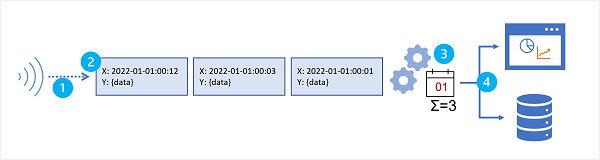
- Unbounded: Data is added to the stream perpetually.
- Temporal: Each record includes time-based data indicating when the event occurred.
- Windows: Aggregation is performed over temporal windows (e.g., posts per minute).
Relacionado: Azure Event Hubs • Azure IoT Hub
📌 Stream Analytics Jobs vs. Clusters
Tipo: Arquitectura
Características:
- Job: The easiest way to use Stream Analytics. Runs in an Azure subscription with configured inputs, outputs, and query.
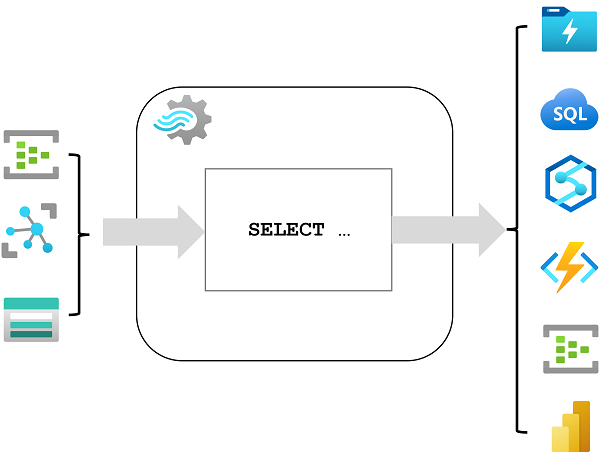
- Cluster: For complex or resource-intensive requirements. Uses the same engine but in a dedicated tenant with configurable scalability.
📌 Window Functions
Tipo: Función
Características:
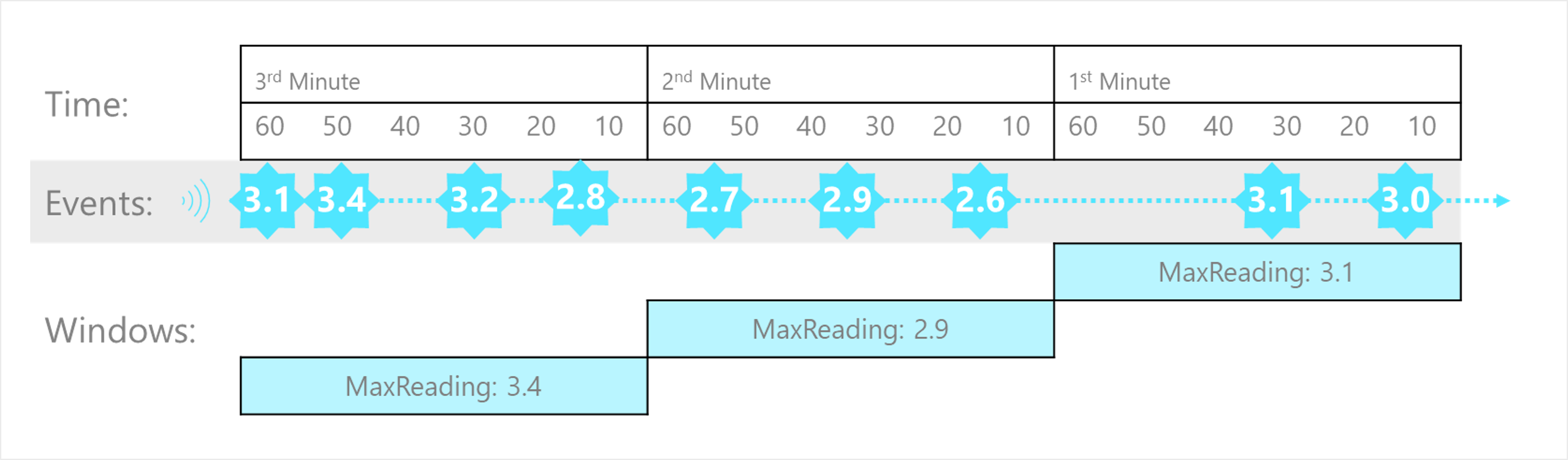
- Tumbling: Fixed-size, non-overlapping time segments.
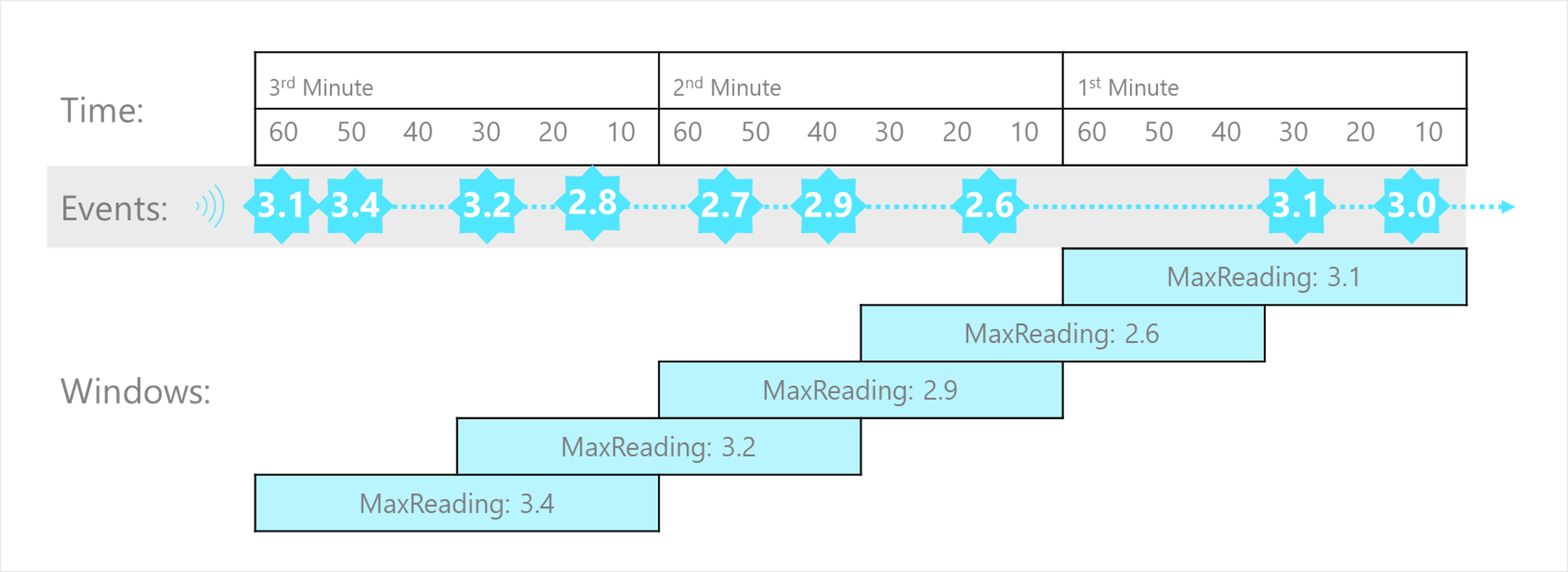
- Hopping: Fixed-size, overlapping windows that jump forward by a fixed period.
- Sliding: Windows that generate events only when the content changes (event enters/exits).
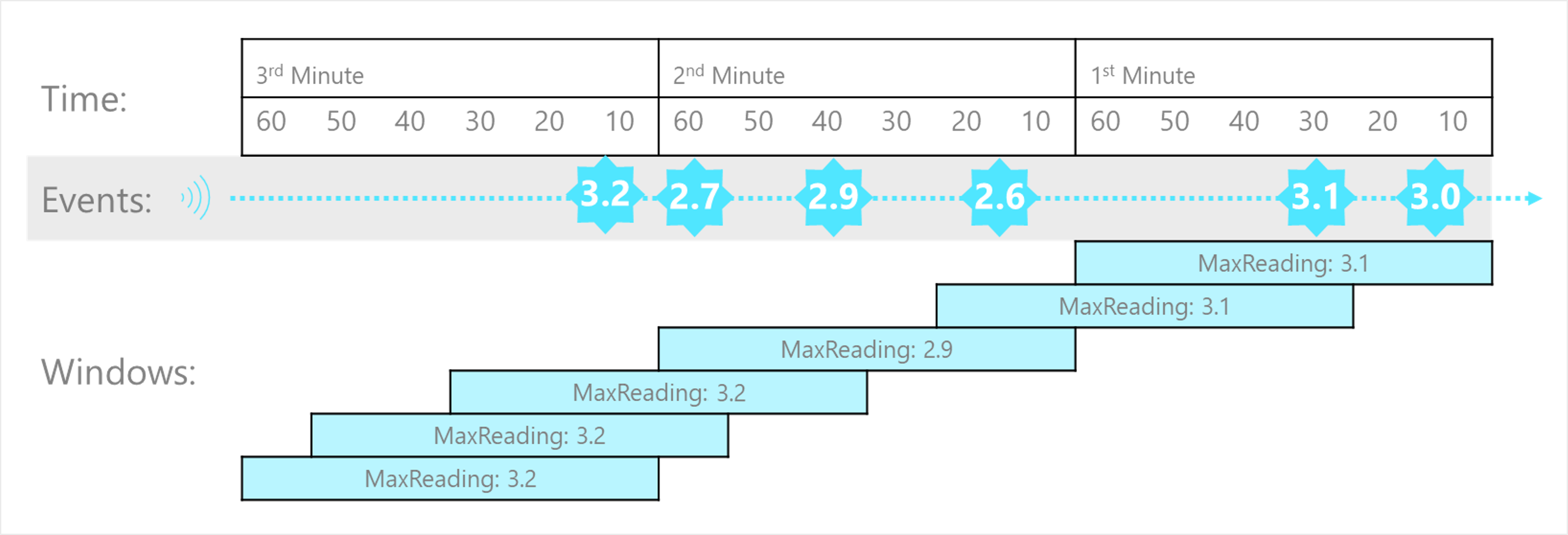
- Session: Clusters events that arrive at similar times, filtering out periods with no data.
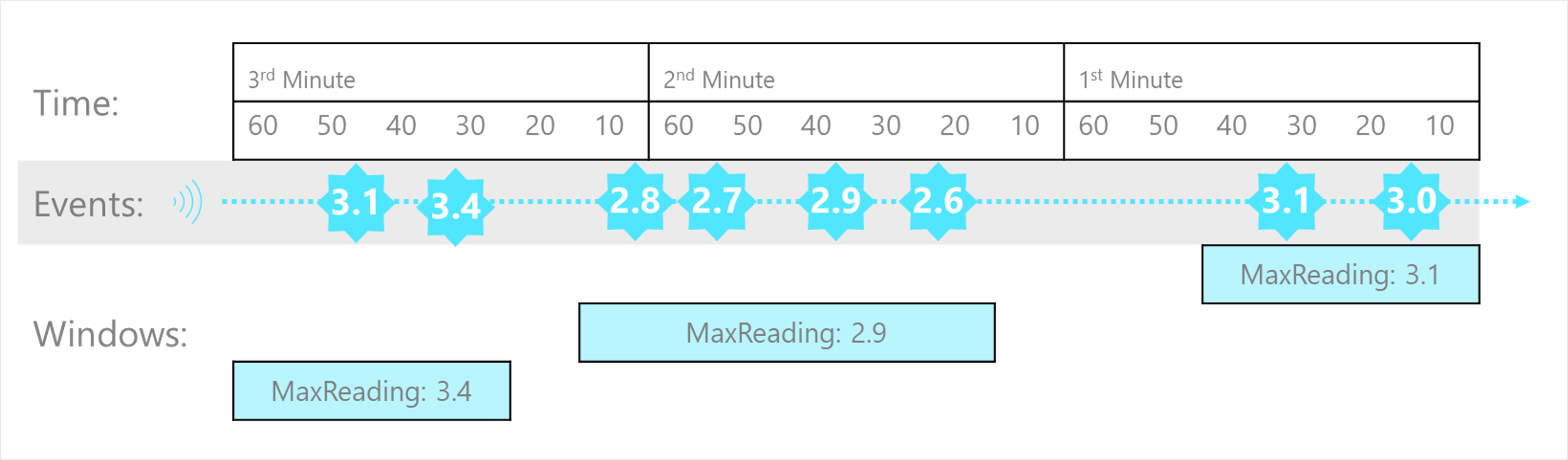
- Snapshot: Groups events by identical timestamp values.
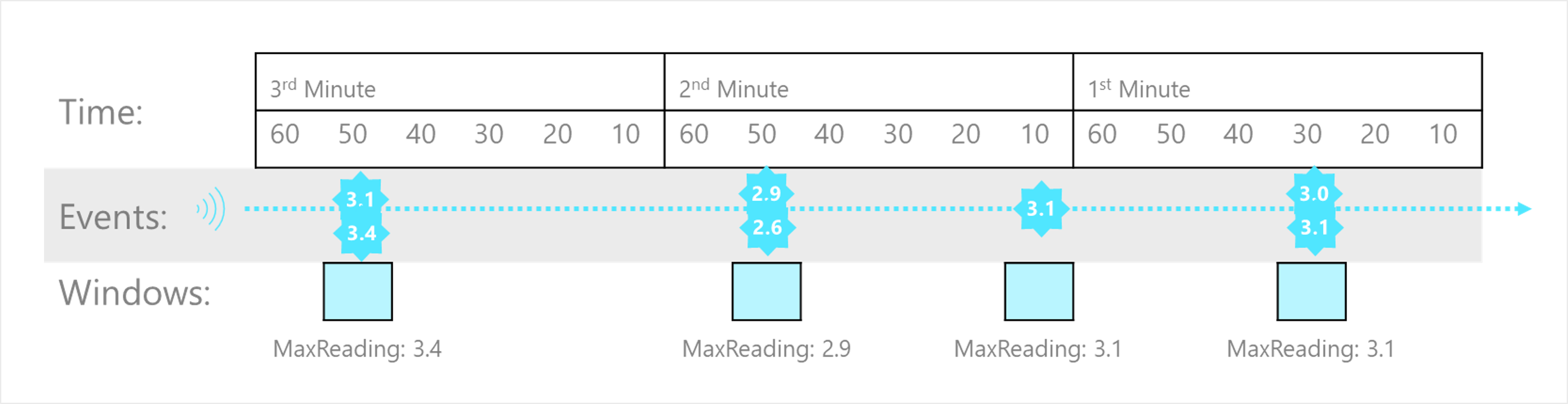
Relacionado: SQL Window Functions
💻 Ejemplo Práctico
Basic Query Structure
Query to filter events with temperature < 0.
SELECT observation_time, weather_station, temperature
INTO cold-temps
FROM weather-events TIMESTAMP BY observation_time
WHERE temperature < 0
Tumbling Window
Find max reading in every 1-minute window.
SELECT DateAdd(minute,-1,System.TimeStamp) AS WindowStart,
       System.TimeStamp() AS WindowEnd,
       MAX(Reading) AS MaxReading
INTO [output]
FROM [input] TIMESTAMP BY EventProcessedUtcTime
GROUP BY TumblingWindow(minute, 1)
Hopping Window
Window size 60s, hop 30s.
SELECT DateAdd(second,-60,System.TimeStamp) AS WindowStart,
       System.TimeStamp() AS WindowEnd,
       MAX(Reading) AS MaxReading
INTO [output]
FROM [input] TIMESTAMP BY EventProcessedUtcTime
GROUP BY HoppingWindow(second, 60, 30)
Sliding Window
Max reading in 1-minute window, outputting only when events enter/exit.
SELECT DateAdd(minute,-1,System.TimeStamp) AS WindowStart,
       System.TimeStamp() AS WindowEnd,
       MAX(Reading) AS MaxReading
INTO [output]
FROM [input] TIMESTAMP BY EventProcessedUtcTime
GROUP BY SlidingWindow(minute, 1)
💭 Reflexiones & Conexiones
Streaming data analytics is crucial for understanding change over time, such as sentiment analysis on social media or monitoring IoT sensors. The alignment with other Azure services (Event Hubs, Blob Storage, Power BI) makes it a central piece of the Azure real-time analytics ecosystem.
🎴 Flashcards
What does Azure Stream Analytics guarantee regarding event processing?::It guarantees exactly once event processing and at-least-once event delivery. Azure StreamAnalytics
What are the three main components of a Stream Analytics job?::Input, Query, and Output. Azure StreamAnalytics
Which window function creates fixed-size, non-overlapping time segments?::Tumbling Window Azure StreamAnalytics
Which window function clusters events that arrive at similar times and filters out periods with no data?::Session Window Azure StreamAnalytics
What is the difference between a Hopping and a Sliding window?::Hopping windows jump forward by a fixed period, while Sliding windows output events only when an event enters or exits the window. Azure StreamAnalytics
📚 Referencias & Enlaces
Enlaces internos: Azure Data Engineer Azure Synapse Analytics Referencias externas: Introduction to Azure Stream Analytics Fuente: Microsoft Learn
📋 Metadata
- Estado: 🌱 Semilla
- Última revisión: 2026-02-19
- Próxima revisión: 2026-02-22
- Veces revisado: 0
- Nivel de comprensión: 🤔 Entiendo parcialmente
- Tiempo estimado de repaso: 15min
💡 Próximos pasos
Cuando revises esta nota, actualiza el contador de revisiones y ajusta la próxima fecha según tu comprensión
🧪 Aplicación
- Explicarlo sin consultar la nota
- Resolver un caso nuevo o escribir un ejemplo
- Compararlo con una alternativa
- Usarlo en un proyecto